That exposure adds up quickly. According to the 2025 Cost of Insider Risks report, the average annualized cost of insider-related incidents is $17.4 million. Criminal or malicious insiders account for 25% of those cases, while credential theft represents another 20%. Dormant or forgotten accounts make both scenarios more likely, since they create entry points that are harder to detect and easier to misuse.
No-code workflows remove much of that risk. Instead of relying on scattered handoffs and memory, access can be disabled automatically across systems as part of a single, controlled workflow. The result is faster revocation, fewer gaps, and a process teams can rely on every time someone exits the organization.
What do you need to implement this automation?
To automate employee offboarding, you’ll need:
- A clearly defined offboarding process: Before automation, the offboarding steps must already exist and be agreed on. That includes which teams are involved, which actions are mandatory, and where responsibility changes hands. Automation enforces an existing process; it does not replace process definition.
- Centralized identity and access control: A central identity layer should govern most authentication and access decisions across the organization, including credentials, roles, and group memberships. In many environments, this layer is implemented through identity providers such as Okta, Entra ID, or Google Workspace. While not every system will be fully integrated, centralizing identity allows the majority of access to be revoked quickly and consistently.
- An inventory of systems and access types: Some access will always sit outside the identity layer. Teams need a clear view of where access exists beyond centralized identity, including standalone SaaS tools, internal applications, shared resources, privileged accounts, and service credentials. Automation can only revoke what has been identified and categorized.
Finally, remember that you’ll need strong alignment among HR, IT, and security. Offboarding automation depends on shared ownership of the process. HR defines employment status, IT manages systems, and security defines access boundaries. If those responsibilities are unclear, automation only shifts the confusion earlier.
The same foundations apply to employee onboarding automation. When access is provisioned through defined roles, centralized identity, and documented systems, offboarding becomes faster and more reliable. Teams that automate both onboarding and offboarding gain better control over the full access lifecycle
How to create an employee offboarding workflow in InvGate?
With InvGate Service Management, you can automate access revocation, remove permissions across systems, and log every action without relying on manual coordination.
The easiest way to start is by using the Employee Offboarding workflow template.
To access it:
- Log in with an admin role.
- Go to Settings > Requests > Workflows.
- Select Employee Offboarding from the list of templates.
- Click Use template to open it in the Diagram Editor.
From there, you can review every step and adapt the workflow to match your internal process. Below are the main stages of the workflow to support a complete and secure employee offboarding process.
HR administrative steps
- Start form: This step formally initiates the offboarding process and captures the data the workflow will need to route requests, set deadlines, and revoke access correctly.
Typical fields in this start form include:
- Employee name and ID.
- Last day of employment.
- Type of hiring (employee, contractor, temporary).
- Department.
- Line manager.
You can extend this form with any fields your organization needs, such as employment type – specific details, country or location, or flags for sensitive roles. Since this data is reused throughout the workflow, taking the time to structure it properly reduces manual clarification later.
Tip: Right after this start form, you can add an automated action to schedule the exit interview. Using built-in building blocks, the workflow can create an Outlook or Google Calendar event based on the employee’s last working days.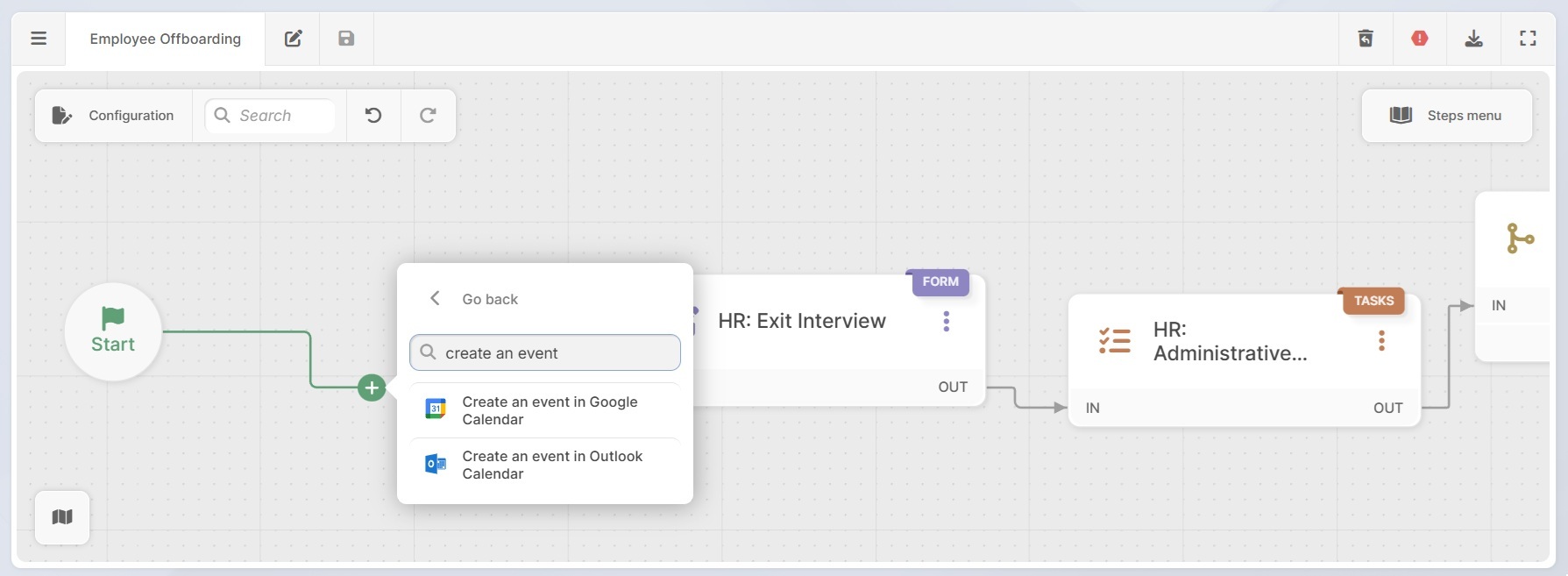
- Exit interview: The next step is the exit interview, implemented as a second form step. Here, the HR manager records feedback collected from the employee and confirms any open topics that may affect offboarding.
Common fields added at this stage include:
- Exit reason.
- Feedback or comments.
- Confirmation of last working day.
- Outstanding items or follow-ups.
- Office access: A conditional step that checks whether the employee has physical office access. If access exists, the workflow will create a request for the facilities or security help desk to revoke building access. This can include disabling entry badges or removing the employee from access control lists.

Disable and revoke digital access across systems
This is where access revocation becomes centralized and scalable.
- Deactivate accounts: This step uses subflows to automatically create requests for the appropriate help desks, based on your internal structure. For example:
- Disable network and domain accounts (typically assigned to a core IT or infrastructure team).
- Revoke access to internal systems and business applications (often handled by application support teams).
- Disable access to cloud services and file storage (assigned to cloud or platform teams).
- Revoke VPN and remote network access (handled by network or security teams).
Each request includes a clear description, an assigned group or owner, a due date, and a high priority. You can adjust these parameters to reflect how responsibilities are distributed in your organization.
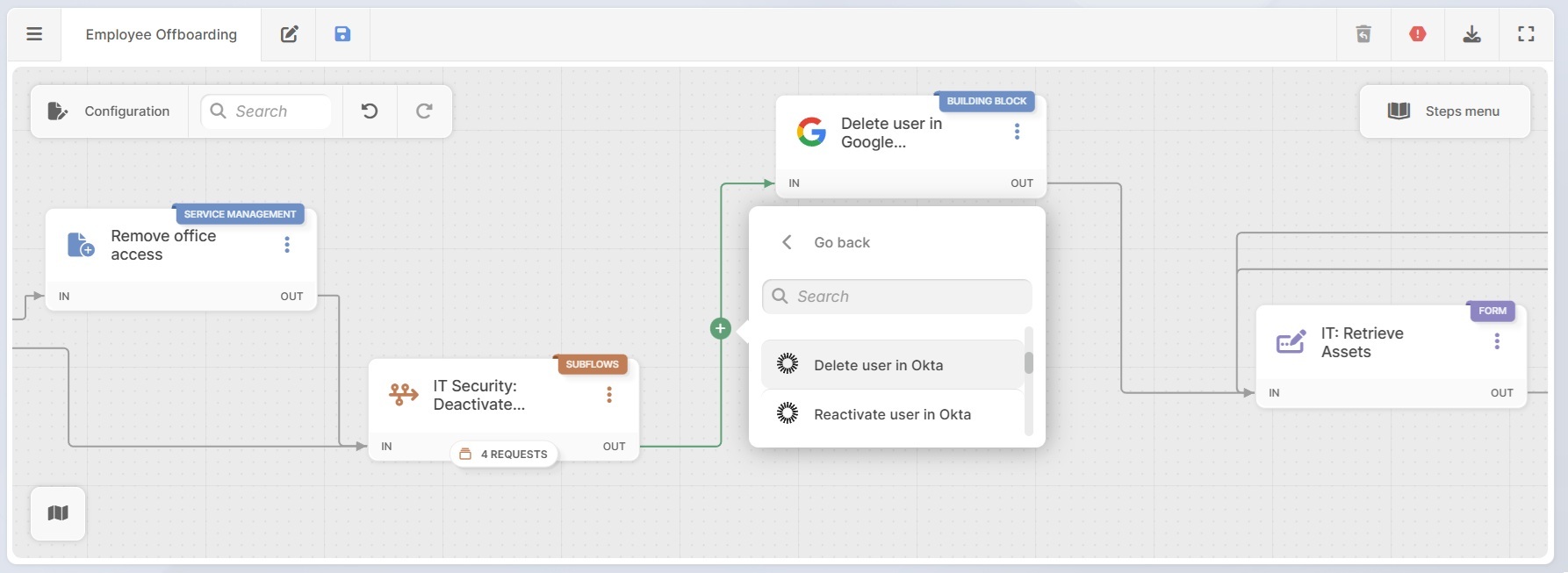
- Automatically delete users: You can also choose to execute access changes directly. Using built-in action connectors, you can add building blocks that automatically trigger actions, rather than just generating tickets.
For example:
- Disabling a user in Entra ID.
- Deleting a user in Okta.
- Deleting a user in Google Workspace.
- Removing permissions in SharePoint.
In addition to the built-in connectors, you can create custom blocks using APIs to support other tools in your environment.

Equipment return and asset updates
Once access is addressed, the workflow moves to asset recovery.
- Retrieve assets form: IT initiates asset retrieval with a list of the equipment to be returned. When InvGate Asset Management is connected, assets can be linked directly to configuration items. This will impact the following steps.
An approval step follows, where an IT manager reviews the equipment return. If approved, the workflow continues. If rejected, corrective actions are triggered, and the employee is notified.
- Integration with Asset Management: After assets are returned, their condition and status are documented in InvGate Asset Management. Ownership, status, and location are updated to reflect that the assets are no longer assigned to the departing employee.
To complete the workflow, an automated email is sent to the employee’s line manager confirming that offboarding is complete. The message serves as confirmation that system access, physical access, and asset assignments have been addressed.
Together, these steps show how the offboarding template goes beyond coordination. Access revocation, permission removal, and documentation all happen as part of a defined workflow, with actions logged and executed across multiple systems automatically.
Download your free employee offboarding process template
Get a ready-made employee offboarding workflow you can use as a starting point or adapt to your internal process. The template includes structured HR steps, access revocation flows, and asset recovery stages we reviewed.
Download the offboarding workflow templateFormer employees keeping access is a common risk when offboarding relies on manual steps. With InvGate Service Management and InvGate Asset Management, you can run this workflow end to end, automate access revocation across systems, retrieve assets, and keep a clear record of every action. See it in action with a 30-day free trial!