The most flexible no-code ITSM solution
Service Level Management: How to Manage SLAs
Service Level Management (SLM) is the practice of defining and controlling how service levels are agreed, measured, and reviewed. It focuses on making sure Service Level Agreements reflect what the business actually expects from IT and that those expectations remain consistent over time.
Once service levels are defined, SLM moves into execution. Teams apply SLA targets to real requests, monitor performance as tickets move through the service desk, and review results to adjust priorities, workflows, or targets when service levels stop matching reality.
What is Service Level Management?
Service Level Management is the practice of defining, monitoring, and managing Service Level Agreements (SLAs) to align IT services with business objectives. SLM sets clear expectations for quality of service, availability, and performance, making sure both the service provider and the customer are on the same page.
SLM matters because service expectations often exist without effective control. SLAs may be documented, but teams lack visibility into how those targets behave during daily operations. Missed deadlines surface late, priorities change without review, and service quality becomes difficult to explain. Service Level Management addresses that gap by turning service commitments into measurable, trackable outcomes that teams can review and improve over time.
How does ITIL Service Level Management work?
In practice, Service Level Management turns service expectations into enforceable SLAs and keeps them under control during daily support work. It starts when teams translate business requirements into measurable targets, such as response time, resolution time, or availability, and document those targets in SLAs.
To make those commitments workable, teams rely on SLOs and OLAs to clarify internal responsibilities and set realistic performance thresholds. Those agreements allow SLA targets to be applied consistently across queues, priorities, and support teams.
Once SLAs are active, the focus shifts to monitoring and adjustment. Performance is tracked through KPIs and service reports while tickets are still moving through the system. When targets are missed or are frequently at risk, teams review the data and update workflows, staffing, or service levels. That operating loop reflects core ITSM fundamentals: clear agreements, visible performance, and ongoing improvement based on real service data.
In short, ITIL Service Level Management works as a continuous cycle based on:
- Inputs: business requirements and service expectations.
- Agreements: SLAs, supported by SLOs and OLAs.
- Monitoring: KPIs, reports, and ongoing performance tracking.
- Improvement: corrective actions and SLA reviews based on real results.
Service Level Management in practice: a 6-step checklist
- Define the services in scope: List the services you actually support and decide which ones need SLAs. Focus on high-volume or high-impact services first.
- Agree on priorities and targets: Set response and resolution targets based on business impact and urgency, not on best-case scenarios.
- Document SLAs and supporting agreements: Formalize SLAs for users, then align internal teams with OLAs and external providers with underpinning contracts.
- Configure SLAs in the service desk: Apply rules so SLA timers start, pause, and stop automatically based on ticket status, priority, and working hours.
- Monitor performance during execution: Track SLA timers on active tickets and use reports to spot trends and recurring breaches early.
- Review results and adjust: Use performance data to update targets, refine workflows, or rebalance workloads as service demands change.
Core concepts: SLA, SLO, SLI, OLA, and XLA
To truly grasp Service Level Management, it's essential to understand its core concepts. These elements form the foundation upon which SLM operates, and each plays a vital role in ensuring service delivery is aligned with business needs.
| What it is | Who it applies to | |
|---|---|---|
| SLA (Service Level Agreement) | A formal agreement that defines service targets, such as response and resolution times. | Between IT (or service provider) and users or the business. |
| OLA (Operational Level Agreement) | An internal agreement that supports the SLA by defining responsibilities between teams. | Between internal support teams. |
| XLA (Experience Level Agreement) | An agreement focused on user experience rather than time-based targets. | Between IT and users, based on perception and satisfaction. |
1. Service Level Agreement (SLA)
An SLA is a formal agreement between a service provider and a customer that outlines the specific service expectations, including performance metrics like uptime and response times.
SLAs are legally binding and enforce accountability between the two parties. There are many types of SLAs, including customer-based, service-based, and multi-level SLAs.
In essence, SLAs set the baseline for what the service provider must deliver. They also include consequences for failing to meet those expectations, which helps to ensure that both parties remain committed to the agreed-upon terms.
“You can’t fix what you don’t understand. When SLAs are missed, it’s not about making excuses — it’s about identifying the why and addressing the root cause.”
Linda Lenox, Senior Technology Operations Leader, Episode 96 of Ticket Volume
2. Service Level Objective (SLO)
SLOs are the measurable goals set within an SLA. These performance objectives define the specific targets that the IT team must meet, such as 99.9% uptime or a 2-hour response time for critical incidents.
Each Service Level Objective provides a clear benchmark for service performance, allowing IT teams to track whether they are meeting their goals. The success of the SLA depends on whether these objectives are consistently met, so SLOs must be realistic and aligned with the customer’s needs.
3. Service Level Indicator (SLI)
An SLI is the measurement of the actual service performance. These indicators provide real-time data that allows IT teams to see how they are performing against their SLOs. Examples include system uptime percentages, mean time to resolution (MTTR), and customer satisfaction scores.
By monitoring Service Level Indicators, IT teams can ensure that they are on track to meet their SLOs. SLIs also serve as early warning systems for potential service failures, enabling teams to take corrective action before service targets are missed.
4. Experience Level Agreement (XLA)
An experience level agreement (XLA) shifts the focus from technical performance metrics to the actual user experience. While a service level agreement (SLA) measures factors like uptime, response time, and resolution speed, an XLA evaluates how well the service meets user expectations, often using metrics like satisfaction scores, usability, and perceived efficiency.
The key difference is that an SLA might indicate success based on system performance, while an XLA reveals whether users feel the service is working well for them.
For instance, an SLA might not be met due to occasional downtime, but if users are highly satisfied because issues are resolved quickly and the service meets their needs, the XLA could still indicate a positive experience.
The Service Level Management process
Implementing Service Level Management involves a step-by-step process that ensures SLAs are designed, monitored, and refined to align with business goals. Here’s a detailed breakdown of the process:
Step 1: Define services and SLAs
The first step in the SLA process is to define the services your organization offers and the SLAs that will govern them. Begin by identifying the core services and understanding the business needs they fulfill. Document these services in a service catalog to provide a clear and comprehensive overview for both IT teams and business units. It's critical to involve stakeholders at this stage to ensure mutual understanding of the services provided and the business objectives they support.
Once the services are defined, the next step is creating the SLA itself. Here are the essential elements to include when building an SLA:
- Description of services.
- Metrics and timing.
- Escalation paths.
- Remedial measures.
Involving stakeholders early in the SLA process guarantees that the agreement reflects actual business needs and expectations. With a well-structured SLA in place, both the service provider and the customer have a clear roadmap to guide service delivery and measure success.
Step 2: Monitor service performance
Use service level indicators (SLIs) to track performance in real time. These indicators provide measurable data points that reflect how well a service meets the agreed-upon targets outlined in the SLA. To ensure accurate monitoring, SLIs should be relevant to the service and directly tied to the key metrics that define success, such as uptime, response time, resolution time, and availability.
There are many ways to design and create different reports on Service Level Agreements. Monitoring performance with real-time dashboards allows IT teams to identify trends and potential issues quickly. You can also set up automated alerts to notify teams when performance metrics approach SLA thresholds to trigger a faster response and prevent breaches.
Step 3: Review and update SLAs regularly
SLAs should not be static. As business needs evolve, so should the agreements that govern service performance. Regularly review SLAs to ensure they continue to align with business priorities. Adjust performance targets as necessary and involve all relevant stakeholders in the review process.
Step 4: Communicate results to stakeholders
Regular communication is key in SLM. To ensure transparency, share performance data with IT teams and business stakeholders. By maintaining open lines of communication, you can foster collaboration between IT and business units, ensuring that everyone is aligned on service priorities and performance.
Step 5: Address SLA breaches
Even with the best planning, SLA breaches may occur. When this happens, it's important to have a process in place for quickly identifying the cause, notifying stakeholders, and implementing corrective actions. This may involve adjusting workloads, reallocating resources, or revisiting service-level targets.
An effective breach response plan can mitigate the impact of missed targets and help restore service levels as quickly as possible.
Step 6: Continually improve services
Use the insights gained from monitoring and reviews to make incremental improvements. Whether it’s optimizing Workflow Management, improving communication or service strategy, or investing in better technology, continuous improvement should be an ongoing goal.
With a focus on improvement, IT services will become more efficient over time, ultimately leading to better business outcomes.
How to implement Service Level Management with InvGate Service Management
Once service priorities and targets are defined, the real challenge is making sure they actually guide daily support work and can be reviewed over time. That’s where Service Level Management needs system support, not just documentation.
InvGate Service Management provides the structure to apply those commitments consistently and keep them visible as requests are handled. The next section shows how this is done in the platform.
1. Create SLAs to formalize service commitments
Service Level Management starts by turning agreed service expectations into enforceable rules. In InvGate Service Management, this is done through SLAs.
Log in as an administrator and go to Settings > Requests > SLA. From here, you can create and manage all first response and resolution SLAs that define how long the team has to act on a request.
2. Choose what the SLA measures
Select the type of agreement you want to create:
- First response SLA to control how long agents have to send the initial reply.
- Resolution SLA to control the total time to solve a request.
Click Add on the selected SLA type.
3. Define when the commitment applies
Service Level Management depends on applying the right expectations to the right requests. SLAs should only apply when specific conditions are met.
InvGate Service Management supports multiple SLA policies, which means you can adapt targets to different help desks, services, or audiences.
Set the SLA conditions using attributes such as:
- Help desk
- Location
- Category or service
- Client type
- Priority
You can combine conditions into groups so the SLA is applied only when all required criteria are met.
4. Add SLA actions
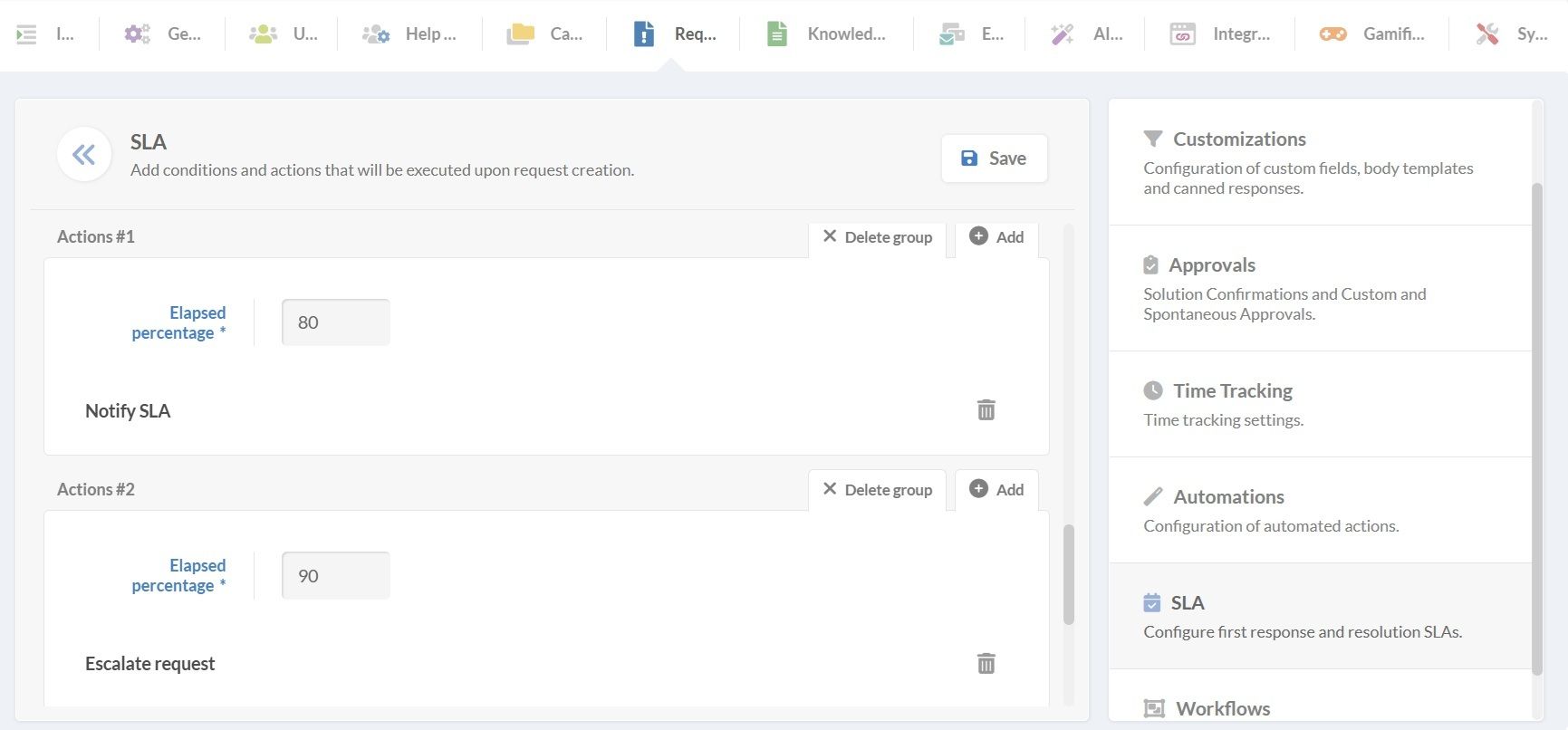
Service Level Management is not only about tracking time, but about acting before targets are missed.
In the Actions section, add automations that run as the SLA progresses or expires. Actions can include:
- Notifying agents when time thresholds are reached.
- Escalating or reassigning requests.
- Changing priority or category.
- Triggering approvals or integrations.
5. Follow SLA compliance with dashboards and reports
Finally, Service Level Management closes the loop by measuring whether commitments are being met. Dashboards and reports in InvGate Service Management let you track SLA compliance in real time and analyze breaches over a defined period.
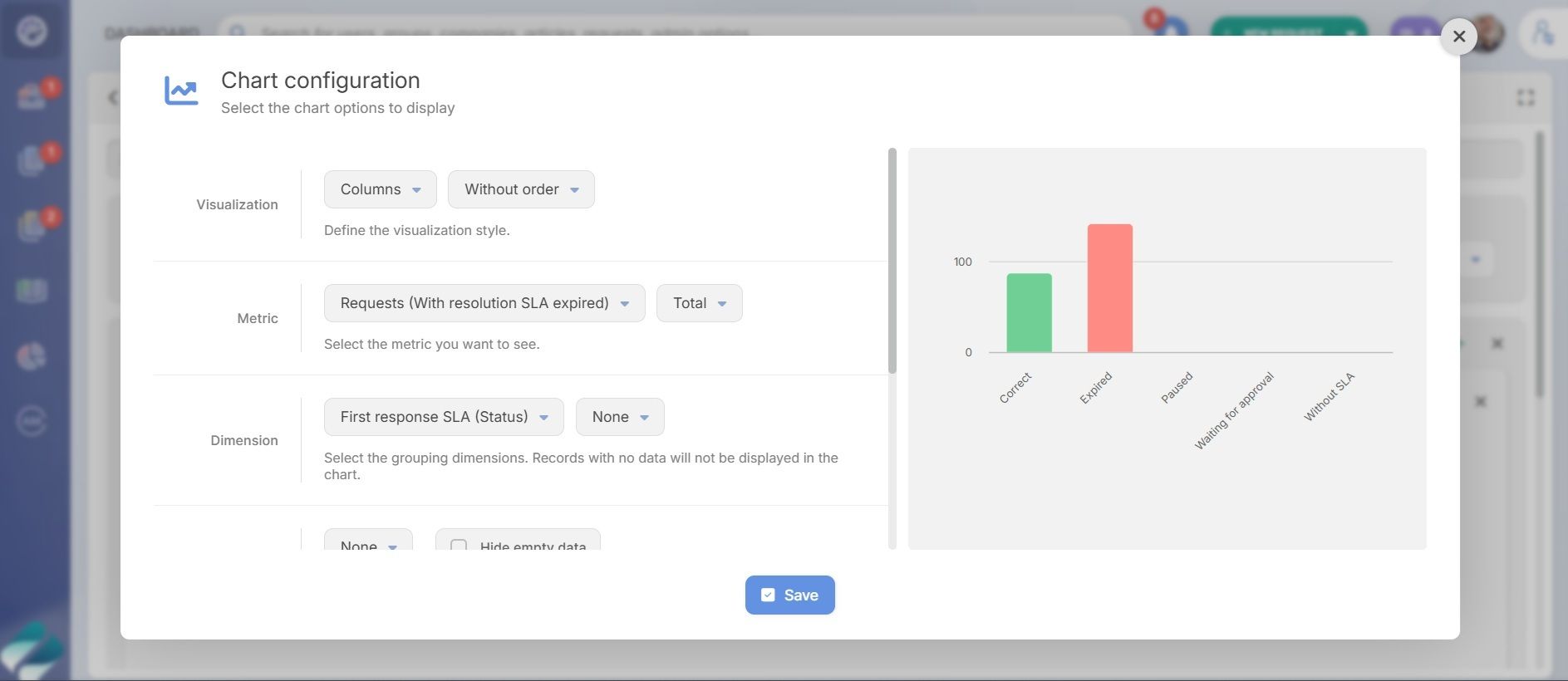
Go to Dashboards and click Add. From there, you can choose from multiple chart types and apply filters such as help desk, category, agent, or SLA status.
Common dashboard views include:
- Requests with expired first response SLAs.
- Requests with expired resolution SLAs.
- SLA breaches by help desk or category.
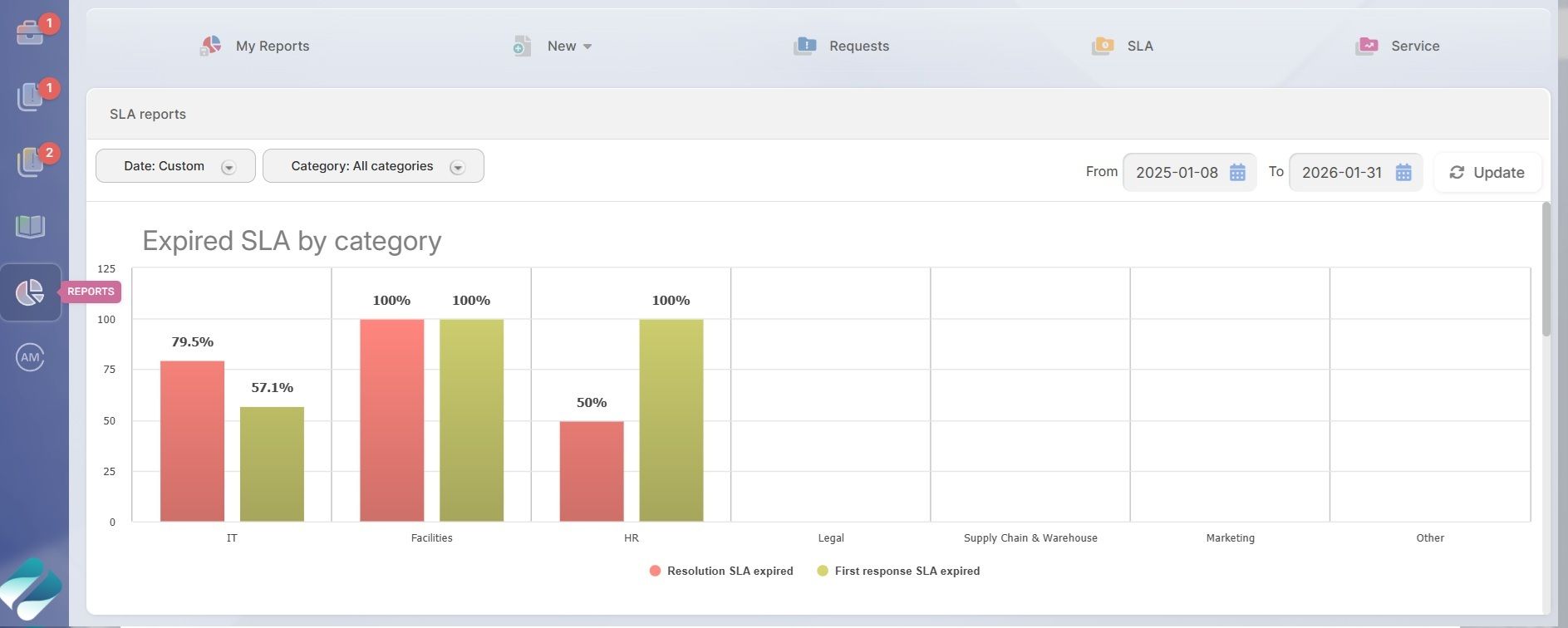
Reports are designed for deeper analysis over time.
Go to Reports > New, and select Requests as the report type. Start by defining the time range you want to analyze, then apply SLA-related metrics, such as:
- Requests with expired first response SLA.
- Requests with expired resolution SLA.
You can break down the data using different dimensions, depending on what you need to review. For example, a report showing expired SLAs by category can quickly highlight whether delays are concentrated in specific areas like Supply Chain or Marketing. Agent-based views help identify reassignment needs or uneven ticket distribution.
Reports can be explored in detail, exported for further analysis, or scheduled for automatic delivery, supporting regular SLA reviews and continuous improvement.
SLA and OLA management in InvGate is easy. You can define, apply, and review service level agreements as part of daily support operations. Start a free trial and explore how it works with full access to SLA configuration, automation, and reporting.
Frequently asked questions
What is Service Level Management in ITSM?
Service Level Management is the practice of defining service expectations, applying them consistently during service delivery, and reviewing performance against those commitments. In ITSM, it ensures that agreed service levels are clear, measurable, and aligned with business needs.
What is the difference between SLA and OLA?
An SLA (service level agreement) defines service commitments between IT and its users or customers. An OLA (operational level agreement) defines internal targets between teams that support the fulfillment of an SLA. OLAs are not visible to end users and focus on internal coordination.
What is the difference between SLA, SLO, and SLI?
An SLA is a formal agreement that states service commitments. An SLO (service level objective) is a specific target within that agreement, such as a response time. An SLI (service level indicator) is the metric used to measure performance against the objective.
What does a Service Level Manager do?
A Service Level Manager is responsible for defining service levels, monitoring performance, coordinating improvements, and ensuring service commitments remain aligned with business expectations. The role often involves working with support teams, stakeholders, and reporting data to adjust targets over time.

Read other articles like this one: